# Ошибки при запуске

<figure><img src="/files/OHPjZItz4yf5YukjvKvq" alt=""><figcaption></figcaption></figure>

Если вы видите такое сообщение при запуске софта, то это означает, что ваш антивирус по ошибке удалил один из необходимых файлов.

### :white\_check\_mark: Решение

<details>

<summary>Для Windows 10</summary>

1. Установите софт заново, но не запускайте его.
2. Добавьте исключение, следуя инструкциям [здесь](https://remontka.pro/exclusions-defender-windows-10/).
3. Запустите софт.

</details>

<details>

<summary>Для Windows 11</summary>

1. Установите софт заново, но не запускайте его.
2. Откройте настройки системы.

<figure><img src="/files/zGqxjTb0DbzmhqcKyrfv" alt=""><figcaption></figcaption></figure>

2. Перейдите в раздел "Безопасность Windows".

<figure><img src="/files/rbumGgCxuILksFyLWQjX" alt=""><figcaption></figcaption></figure>

3. Перейдите в раздел "Защита от вирусов и угроз".

<figure><img src="/files/teieQ1pCAfjwQk9z9UNs" alt=""><figcaption></figcaption></figure>

4. Перейдите в управление настройками защиты.

<figure><img src="/files/KwtRdtydewlpjtgpL6N4" alt=""><figcaption></figcaption></figure>

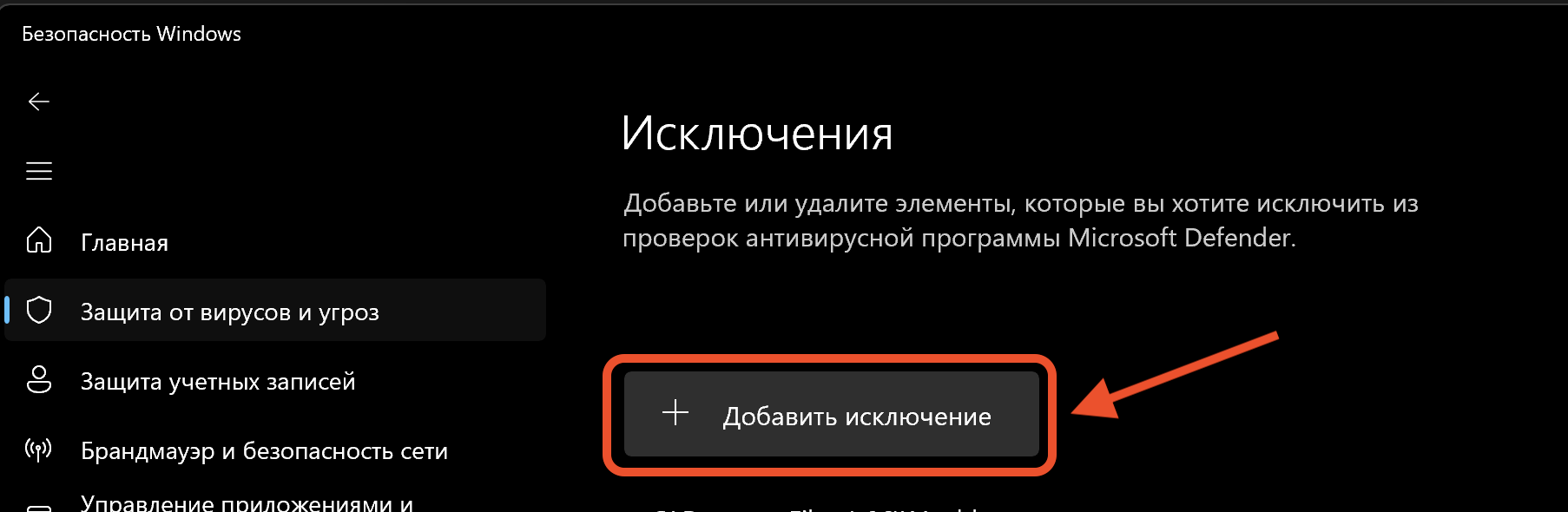
5. Прокрутите страницу вниз и перейдите в настройки исключений.

<figure><img src="/files/PMKFEnZG0CSarDeIiQFb" alt=""><figcaption></figcaption></figure>

6. Добавьте исключение, указав папку с установленным софтом.

<figure><img src="/files/323uQP5uNdTDs9CyWkJg" alt=""><figcaption></figcaption></figure>

7. Запустите софт.

</details>


---

# Agent Instructions: Querying This Documentation

If you need additional information that is not directly available in this page, you can query the documentation dynamically by asking a question.

Perform an HTTP GET request on the current page URL with the `ask` query parameter:

```
GET https://docs.teleraptor.ru/misc/antivirus.md?ask=<question>
```

The question should be specific, self-contained, and written in natural language.
The response will contain a direct answer to the question and relevant excerpts and sources from the documentation.

Use this mechanism when the answer is not explicitly present in the current page, you need clarification or additional context, or you want to retrieve related documentation sections.